(03) 9138 0580
(03) 9342 8615
rmh.libinfo@mh.org.au
M - F: 8:30am - 5:00pm

Jump to:- Mobile Apps | Browser Plugins | Search Tools | Data Analysis Tools
The new library mobile app is the mobile gateway to your library.
With this app you can keep track of your reservations and the items you have on loan. Which you can then renew straight from the app.
The app also acts as a digital library card. When logging into the app the library you will select is "RMH Health Sciences Library". Login using your library membership details.
If you are borrowing a book, or need your library membership number, just open the app instead.
DOWNLOAD


Browzine brings recent issues of scholarly journals to your tablet for browsing and reading. You can save your favourite journals, view tables of contents, and read or save articles as new issues are reseased.
For information on using Browzine and accessing the desktop version of Browzine please see the Browzine library helpguide.
DOWNLOAD
Register for a free account by going to https://www.uptodate.com from any onsite computer in the Library, or connected to the RMH hospital networks. Onsite re-registration is required every three months.
Instructions for setting up UpToDate remote access and the mobile app can be found here.
DOWNLOAD
The MIMS app (for Android and Apple) provides full and abbreviated drug information for pharmaceuticals available in Australia. It also includes a drug interaction information module and a pill identification tool.
Using the app requires a token. You can find the instructions for requesting that token in this document.
DOWNLOAD
To access the Therapeutic Guidelines app please check the Therapeutic Guidelines FAQ page on setting up and authenticating.
You can use the links below to download the app itself.
DOWNLOAD
Register to use the APP when onsite through any computer connected to the RMH or RWH networks.
DOWNLOAD
MICROMEDEX Drug Information and MICROMEDEX Drug Interactions are available as mobile apps.
Follow the instructions on the Clinicians Health Channel for setting up the app.
DOWNLOAD
The Access App from McGraw Hill Medical is a personalized interactive learning solution that makes studying easier and more efficient. Learners can search vetted and trusted medical content across a variety of mediums that best fit their learning needs, including: books and chapters (including exam-related texts), videos, podcasts, infographics, images, tables, and figures.
Users need to create a free Access profile in the web version of AccessMedicine. With an Access profile, users can then save content to favourites and organize their collections, manage notifications, track their history and resume activities, and more.
To creat a MyAccess account:
- Log into AccessMedicine
- Check to make sure that it says Access Provided by: Royal Melbourne Hospital (Melbourne Health Sciences Library)
- Select the Sign in > Sign in or Create a Free MyAccess Profile from the dropdown [top-right corner]
- Click the Create a Free MyAccess Account button
- Complete the form and click the Create Profile button
- Go ahead and download the app below, then login
For more information, visit McGraw Hill's dedicated Access App library guide.
DOWNLOAD
The LibKey Nomad Browser extension puts direct PDF download links into PubMed, research platforms & journal publisher pages.
Available for Chrome, Microsoft Edge, Firefox, Brave and Vivaldi browsers. Not currently available for Safari.
To download the plugin go to https://thirdiron.com/downloadnomad and follow the instructions to add this extension to your browser.
To download the plugin go to the Google Scholar settings page and follow the instructions to add this extension to your browser.
You will also want to check out this libguide on configuring which library links you want to use for direct linking to articles.
Zotero is a free, open-source research tool that helps you collect, organize, and analyze research and share it in a variety of ways.
The Zotero Connector allows you to save to Zotero directly from your web browser.
Visit this page to download the Zotero Connector for your browswer.
EndNote Click (formerly Kopernio) is designed to fit into your existing literature search workflow and works with thousands of academic platforms.
Available for Chrome, Microsoft Edge, Firefox and Opera with an additional plugin.
To download the plugin go to this libguide and follow the instructions to add this extension to your browser.
Google Scholar provides a simple way to broadly search for scholarly literature.
Google scholar also provides the option to link directly to articles that are held by your library.
To activate this function please see this libguide about configuring library links for your Google scholar account.
The library maintains a list of free data analysis tools which can provide useful alternatives to programs such as SPSS or NVivo.
Visit the free software page in the library libguides to check out what is available.
Victorian Mental Health Photograph Collection
Apologies, the Victorian Mental Health Photograph collection is not available for viewing until further notice.
The Royal Melbourne Hospital Health Sciences Library, incorporating the Victorian Mental Health Library, holds the photograph collection entitled the ‘Mental Health Photograph Collection’ on behalf of the State of Victoria, acting through the Department of Health & Human Services Mental Health Branch.
The photograph collection previously available at Royal Park Psychiatric Hospital Library contains around 3,000 items. These date from the mid 1800s to 2002, with most pictures taken in the 1960s.
They depict special events with key political or mental health figures, or feature promotional shots of everyday life in Victorian mental health institutions. People, furnishings, equipment, activities and buildings are shown.
Please note:
- Formats range from negatives, glass and photographic slides, to colour or black and white prints. There are also a small number of site plans and sketches. Sizes vary from 3 cm to poster.
- The collection DOES NOT CONTAIN any records relating to the operations, patients or staff of the various mental health asylums.
- The Health Sciences Library do not have the Copyright to all of the photographs in the collection, we may need to contact the Department of Health & Human Services Mental Health Branch for permission to use.
- Permission may only be granted for NON-COMMERICAL USE.
Some of the institutions represented include:
- Aradale Hospital Ararat Hospital for the Insane
- Ballarat Mental Hospital
- Beechworth Mental Hospital/Asylum
- Box Hill Occupation Clinic
- Carlton Lunatic Asylum
- Heatherton Sanatorium
- Hobson Park Hospital
- Janefield Colony
- Karlyn Kinkora Hostel
- Kew Asylum / Kew Cottages
- Lara Sanatorium for Inebriates
- Larundel Mental Hospital
- Mont Park Montdoora Mental Colony
- Royal Park Psychiatric Hospital
- Sunbury Asylum/Mental Hospital/Training Centre
- Traralgon Mental Hospital
- Travancore Clinic
- Trelowarren Rehabilitation Base
- Willsmere Hospital Yarra Bend Lunatic Asylum
Help Guides
Library Membership
Joining the Library
Library membership is free. Join using our online form.
Membership Eligibility
Your Library Account
-
- Log into your library account by selecting "Library Account" from the main menu, then select "Login to RMH / RWH account".
- This will take you to the login screen for your institutuion where you will enter your library membership number as well as your password.
- From your Library Account you can check what books you have on loan and renew any that are eligible.
- From the "Library Account" menu you can also reset your password for your library account if you have forgotten it.
Using the Library
Accessing the Library at Work
All eligible staff can access library resources from any networked PC or device connected to the hospital WiFi network without the need to login
Accessing the Library remotely (offsite access)
-
- Library membership is required to access library resources using non-networked or personal devices.
- When accessing electronic resources through the library website from offsite you will automatically be asked to enter your library membership and password.
To access resources remotely find them as normal through the library homepage. When you click on the link to the resource instead of being granted access automatically you will instead see a login screen. Enter your library membership number and password, and you will then be taken to the resource as normal.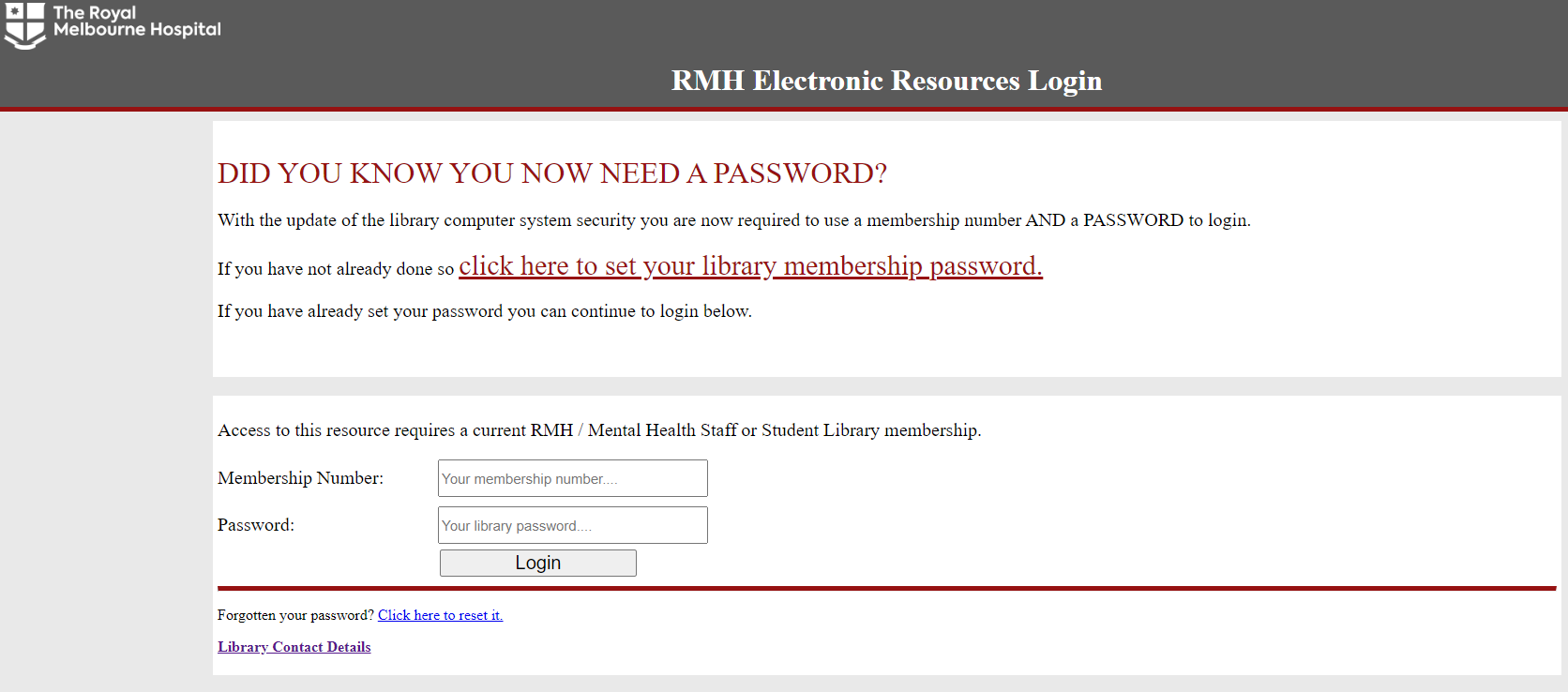
Accessing journal articles
This Libguide on accessing journal articles, developed by the clinical support team, shows the various methods of accessing journal articles.
Additionally you can view our demonstration video for accessing articles from the website.
Accessing library databases
You can view our demonstration video for accessing library databases from the website.
Research Guides
Research Guides
Copyright Information Help Guide
Institutions expect their staff and students to act in accordance with copyright and licencing obligations, so it is important to have up to date and relevant information. This Copyright Information Help Guide focuses on important information reasearchers need to understand about Copyright and Intellectual Property.
Diversity in Research
Literature Searching Help Guide
This Guide to Literature Searching focuses the basics of performing a literature search including how to break your research down into managable steps.
Google Search Help Guide
This Google Scholar Help Guide focuses on how to access google scholar and activate library links so that you will see links to articles available in the library collection.
You can also find addtional information on advanced google searching at this Melbourne University Help Guide.
Publishing your research
This Publication Toolkit focuses on advice about publishing your research work and maintaining your author profile.
Subject Alerts Help Guide
This Help Guide on Subject Alerts will demonstrate how to set up subject alerts for new content in Medline and Embase.
Systematic and Literature Reviews
This guide discusses what is involved in doing a systematic review, or other type of literature review. It discusses the different types of resources, information on planning, doing and reporting reviews, and includes links to useful resources and tools.
Journal Alert / TOC Help Guide
If your looking for help on setting up alerts to your favourite journals so that you will be notified when there is new content you will want to take a look at our TOC Libguide.
Critical Appraisal Help Guide
This Critical Appraisal Libguide developed by the clinical support team lays out the steps involved in the process.
Search Tools
Google Scholar Browser Plugin
There is a Google Scholar browser plugin available to speed up access to Google Scholar searches, as well as to move a google search over to a Google Scholar search. You can find the link to this plugin on our Search Tools & Apps Page. Searches with this plugin will also pay attention to any Library Links you have set up for full text access.
You may also want to see our Google Scholar LibGuide for more information, and this Library Links LibGuide for information on how to configure Google scholar to show you direct links to articles.
LibKey Nomad full text linking
The LibKey Nomad Browser extension puts direct PDF download links into PubMed, research platforms & journal publisher pages. A link to it can be found on our Search Tools & Apps page.
Browzine
Set up quick, personalised access to your favourite journals. You can view tables of contents, and read or save articles using your mobile device or browser on the desktop. You can also create your account within the app and use it to "bookmark" your favourite journals to track and be notified when new content arrives.
-
-
- To download the app, visit our Search Tools & Apps page.
- Check out our Browzine libguide for more detailed information.
-
Library Mobile App
Search the library catalogue, be notified about library news and access your account and electronic library card using our dedicated library mobile app.
The library offers individual or small group training to support research, education and patient care.
Some of the topics include:
- Searching Databases
- Reference management
- Using Library Search Tool
The library also offers general orientation for the library services and facilities. This is particularly useful for groups of new staff just coming onboard with the hospital.
Contact the library to discuss your needs, onsite and online options are available.